Odoo Mail Pro · Odoo 19
Outlook and Gmail, properly inside Odoo
Microsoft 365, Google Workspace and IMAP
Your entire business runs on Odoo, but your email runs on Outlook or Gmail. Two systems for one business. They work together, kind of. What if email and Odoo were better integrated?
- Sent from your own Outlook or Gmail
- No notification@ address
- In your Sent Items
- Replies land on the record
The beta is open. 500 mails a month free, no credit card needed.
-
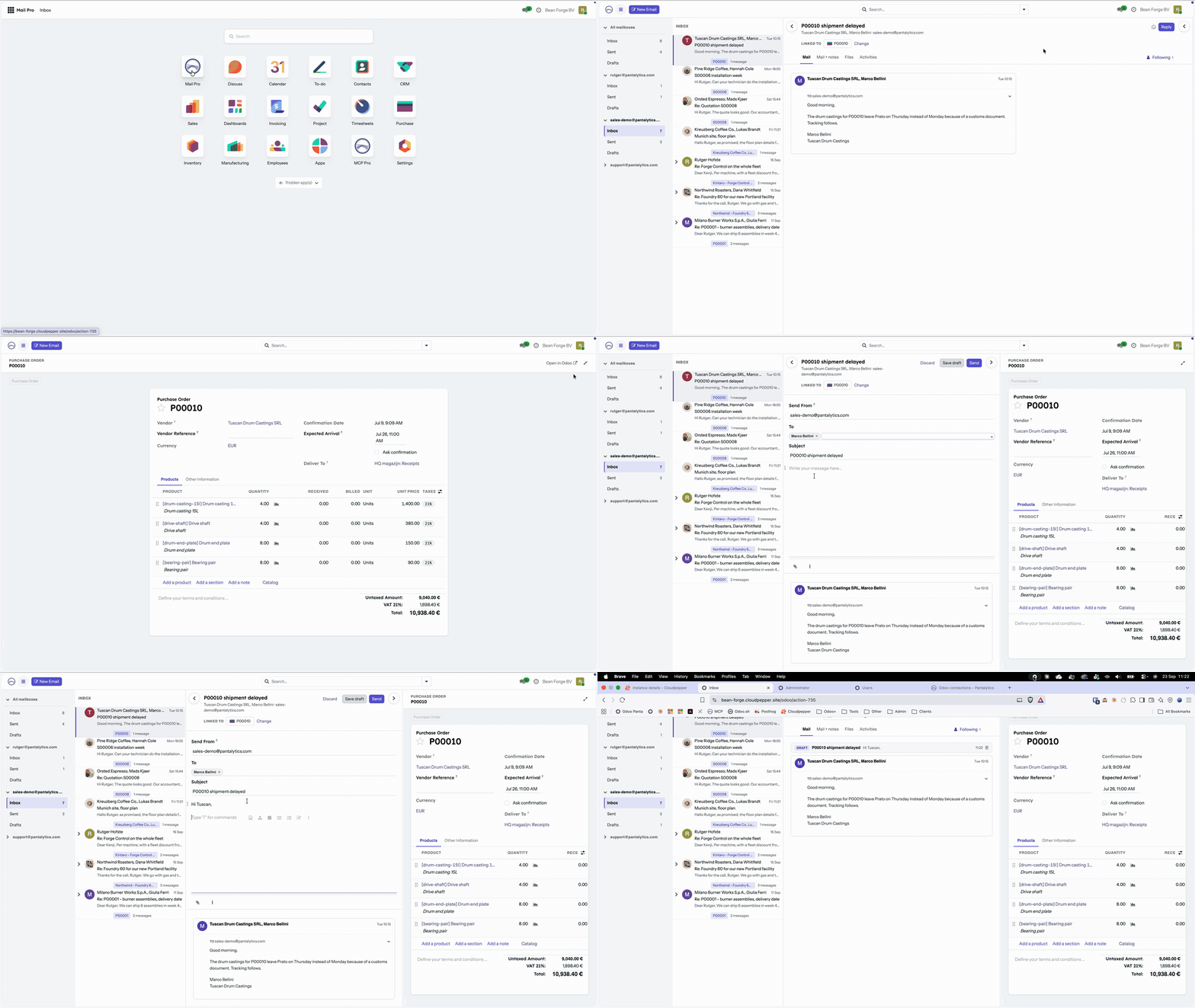
See it work. A supplier mails about a late order. The order opens beside the mail, you answer, the draft is saved on the order. -
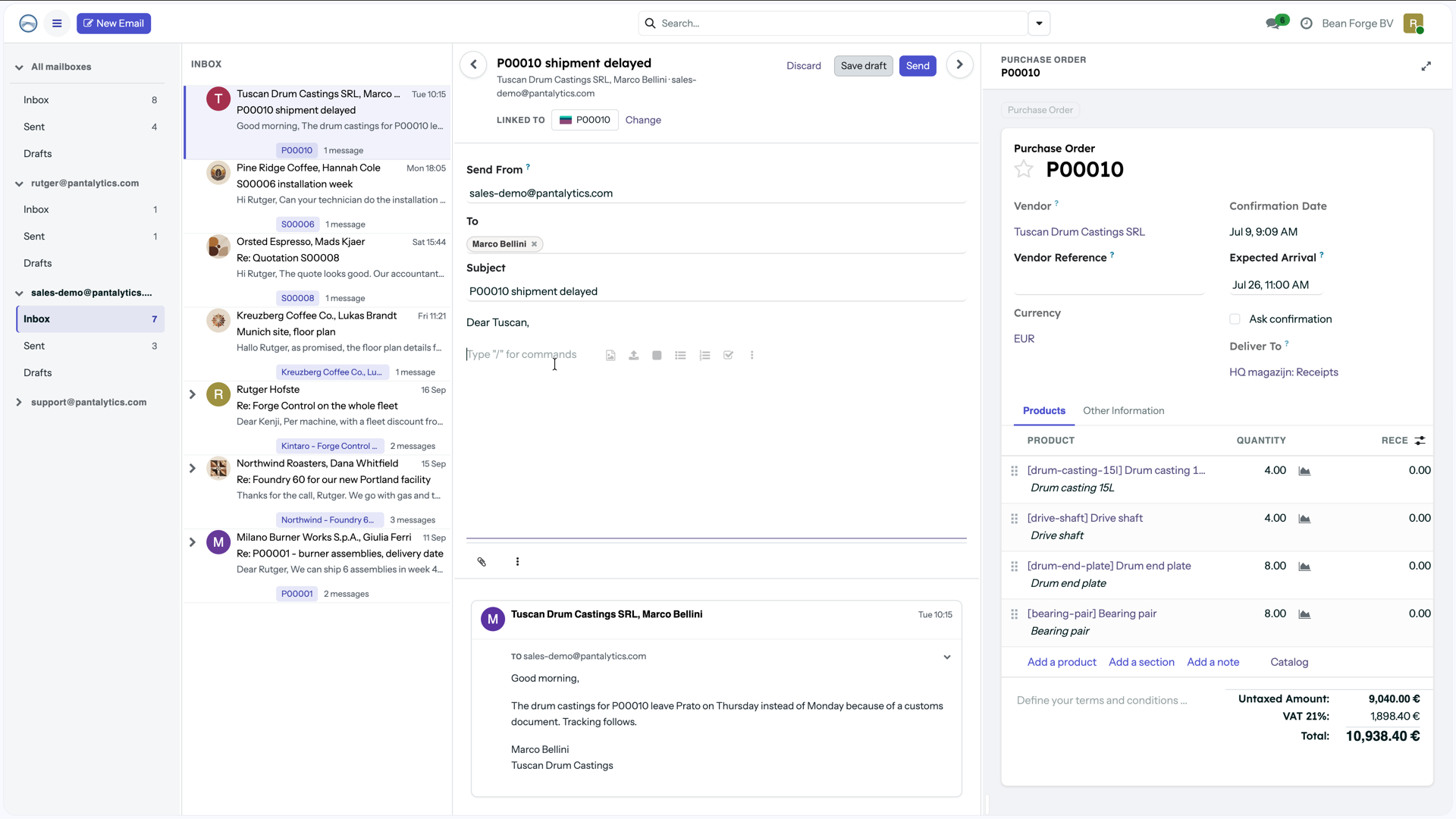
The fourth column. Your inbox, the conversation and the record it belongs to, side by side. -
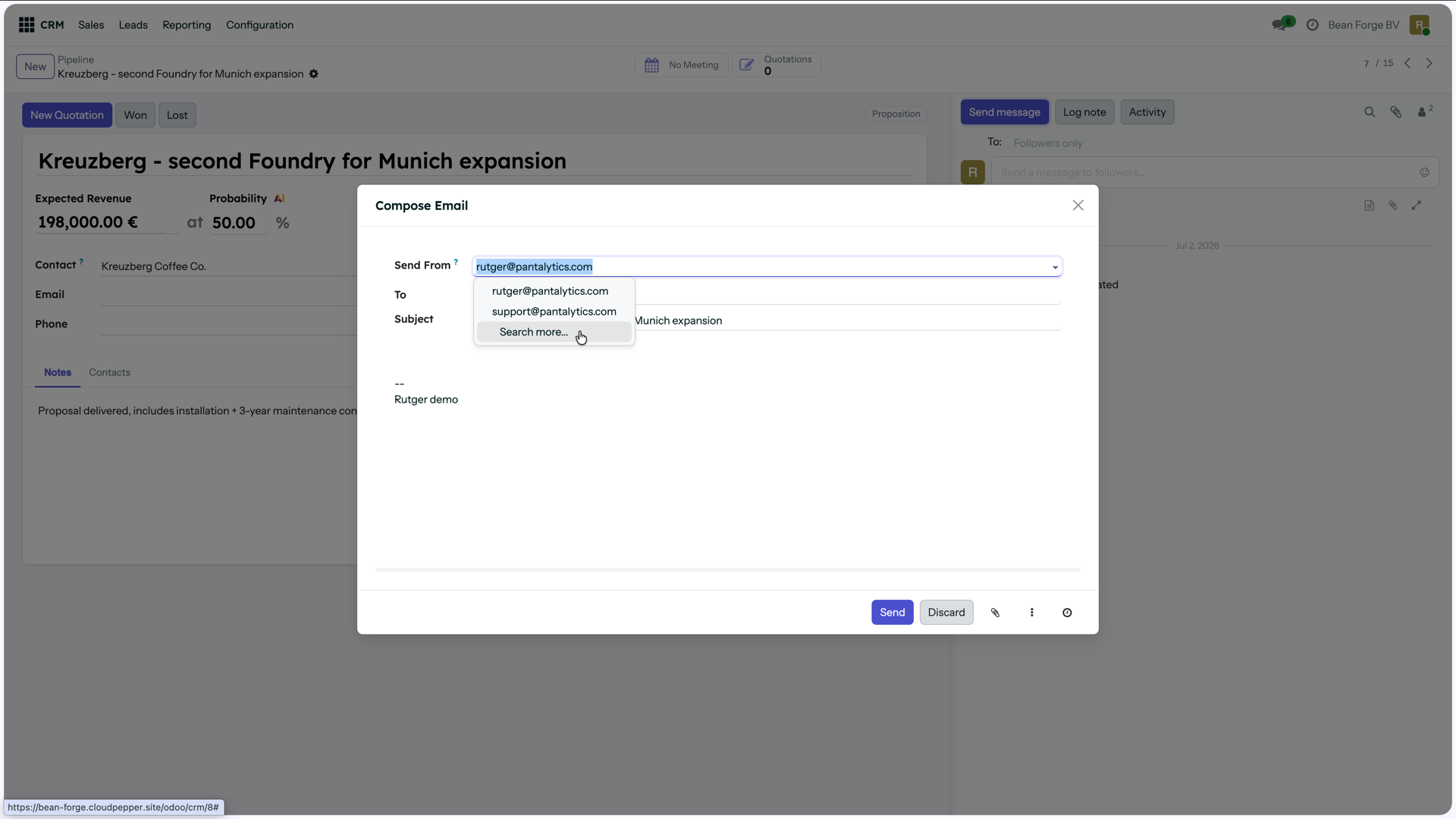
Send from. Pick who the mail comes from: you, or a shared address. -
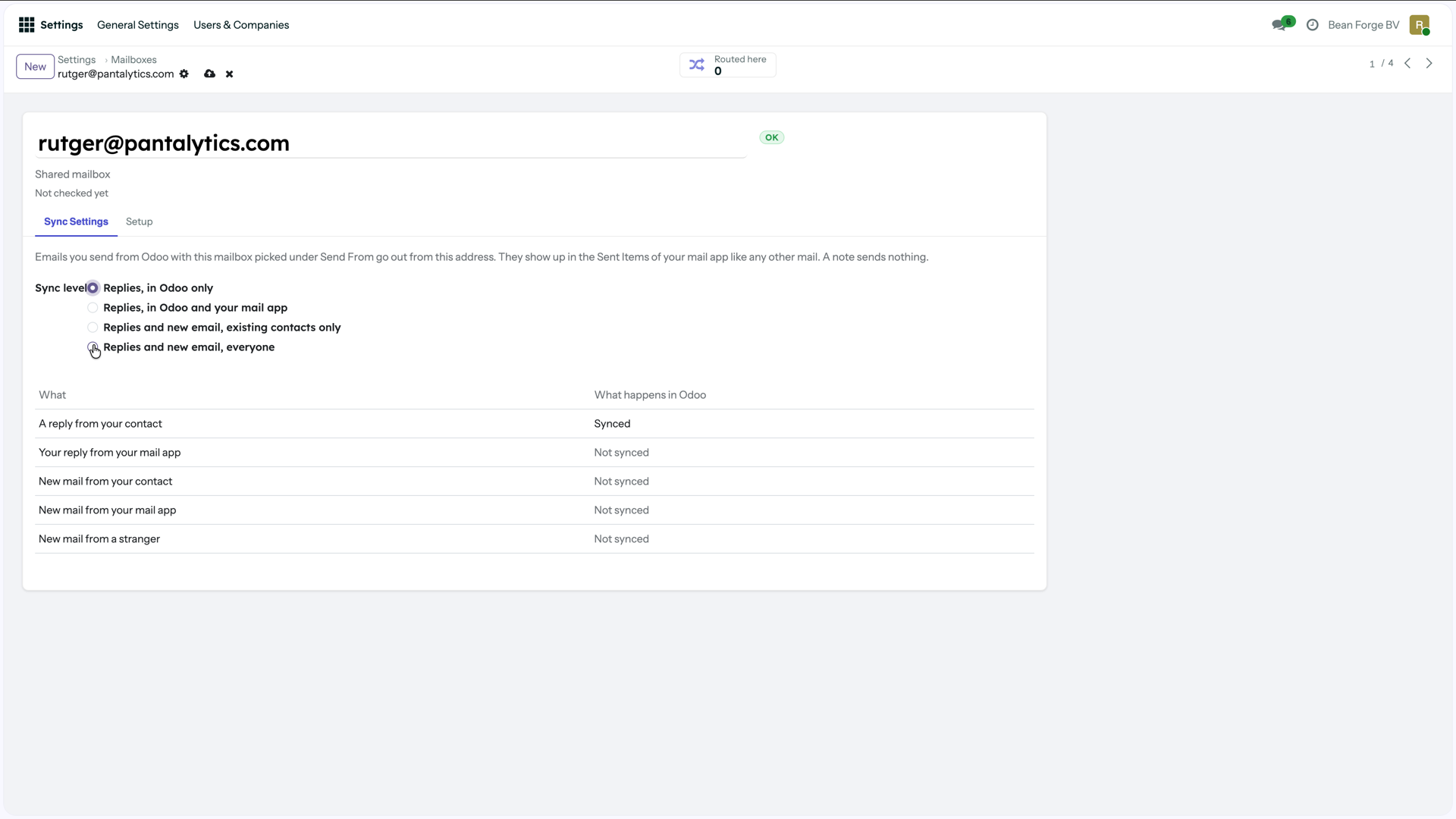
You decide what syncs. Four levels per mailbox, and a table that says what happens in Odoo. -
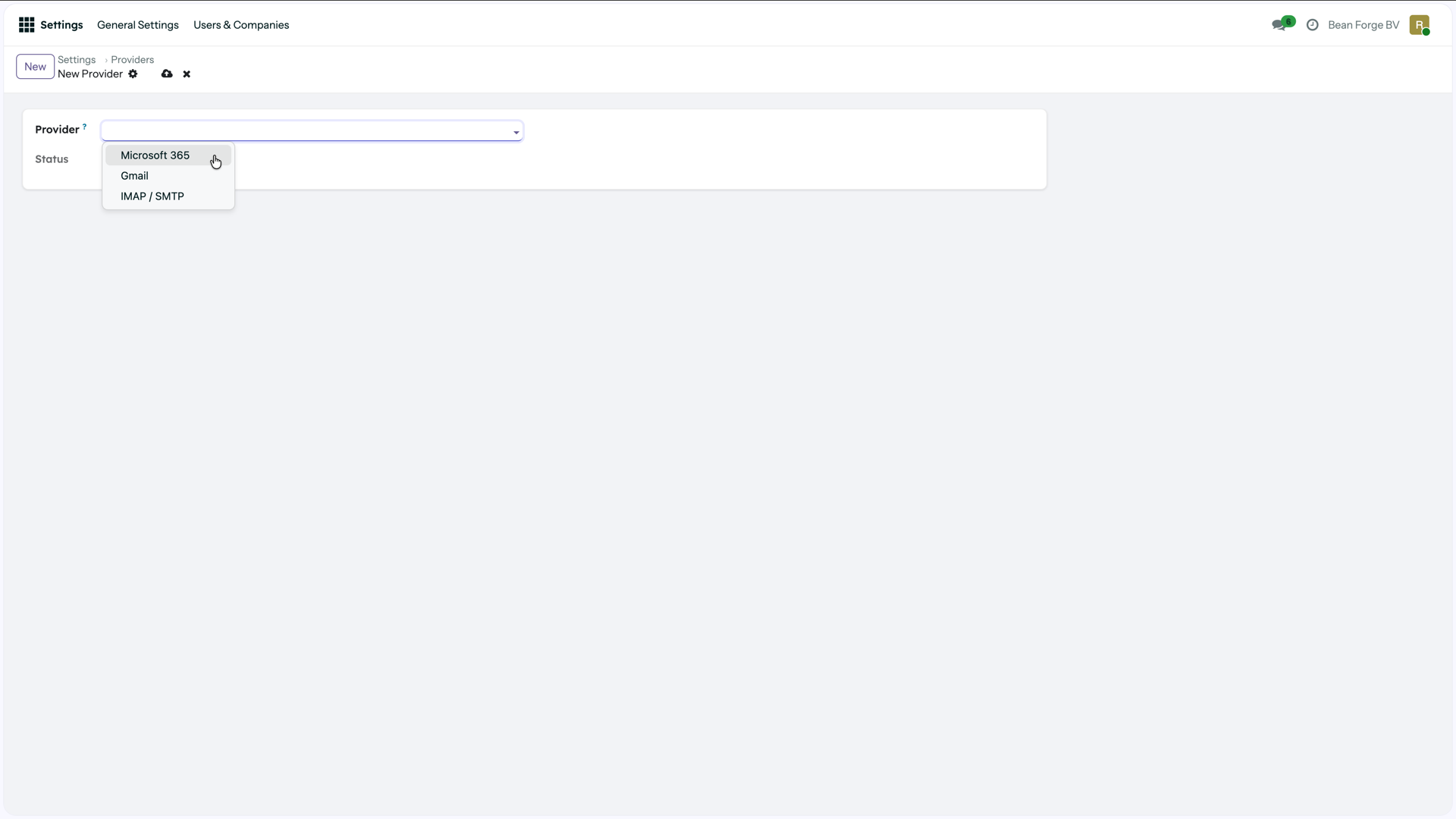
Any provider. Microsoft 365, Gmail or plain IMAP.
We asked Odoo users
Does email kind of work in Odoo?
In September we asked the Odoo users on our mailing list that question. Here are some of the answers. No names, their words.
Doing everything from one place without switching to Outlook is exactly what we want. It's the reliability that holds us back.
Some clients claimed to not receive our emails, so we reverted back to sending emails from Gmail and Outlook.
Mostly Outlook, to ensure delivery and to make sure it's in Outlook for traceability.
Each reply arrives at the customer as a new singular email. Not the full conversation thread, like in Outlook.
I would like to see the sent and received emails in my Outlook as well. So far that's not happening.
Copying the notification email address (like notification@odoo...) directly does not work for them.
The part that matters
The email really goes through Outlook or Gmail
You write in Odoo, but Microsoft or Google sends it. To the customer it's just an email from you.

From you, not from a robot
No notification@ address, no alias, no odoo.com in the sender. The customer sees your name and your address.
Your mailbox or a shared one
Send from your own mailbox, or from sales@ or support@. You pick it per email.
In your Sent Items
What you send from Odoo sits in Outlook or Gmail next to your other mail. Whoever works in Outlook sees the whole conversation.
Sent right away, and it arrives
You press Send and your provider sends it, from your own domain. It arrives like any other email you send.
Secure
You sign in with Microsoft or Google. Odoo never sees your password, and your mail doesn't pass through us.
And the rest
Replies come back into Odoo
Replies land on the right record
- Inbox and Sent sync both ways, every minute.
- A reply gets matched to the quote, ticket or lead it belongs to. Our own headers first, then the References chain, then the provider's thread id, then a best guess from subject and participants.
- Every incoming mail gets a line in the routing log: where it went and why. When something lands in the wrong place you can see what happened.
- Sync mail from known contacts only, or from everyone, with contacts created as you go.
- Point a shared mailbox at a team and new mail becomes a lead or a ticket.
Read the whole conversation in Odoo
- An inbox inside Odoo. Folders, then conversations, then the thread, and the record on the right.
- Reply from there, with the quote or the ticket open next to you.
- No copies. Messages stay on the record they belong to, with the same access rights.
- Linked to the wrong record? Fix it once and the rest of the thread follows.
Setup
Three steps
Register the app once
One app registration with Microsoft or Google. For IMAP it's just a server, a login and a password.
Everyone connects their own mailbox
One consent screen per person. Odoo never sees a password.
Choose what syncs
Which mailboxes, from what date, and what to do with senders you don't know yet.
That's it. No catchall, no bounce alias, no DNS records.
Installing it
Mail Pro is on GitHub, source available under the Elastic License 2.0. On Odoo.sh, add it as a submodule. On Cloudpepper, add the repository under Modules. On your own server, put it in the addons path. Then connect it to your Pantalytics account with one button in Odoo.
git submodule add -b 19.0 https://github.com/pantalytics/pan_mail_pro addons/pan_mail_pro Providers
Works with your mail provider
Microsoft 365
Through the Graph API, with OAuth. Personal and shared mailboxes.
Google Workspace
Through the Gmail API, with OAuth.
IMAP and SMTP
Your own server, Soverin, Fastmail, whatever you run. Server, login, password.
Where your mail goes
- Odoo talks to your provider directly. Your mail doesn't pass through us.
- OAuth with delegated permissions only. Odoo can do what you can do, nothing more.
- Tokens are encrypted before they're stored.
- The daily licence check sends counts and error codes. There's no field in it for an address, a subject or a message.
Pricing
You pay per mail, not per user
Every Odoo instance gets 500 mails a month for free. After that it's €6 per 100 mails. Mail you send and mail you receive both count. No plans, no seats.
The number of people is an estimate. It assumes about 220 mails per person per month, which is what our own team sends and receives through Odoo. Your team can be different, because it depends on how much of your mail lands in Odoo. The first import when you connect a mailbox doesn't count.
Over 500 without a card? Mail you send always goes out. Only incoming mail waits until next month, or until you add a card.
The Mail Pro beta is open
Sign in with your Pantalytics account, install the module and connect your first mailbox. The app walks you through it. If something breaks, tell us. That's what the beta is for.
Start for freeFrequently asked questions
What does Mail Pro do?
Mail leaves from the mailbox of the person sending it, instead of from a notification address. Replies come back and land on the quote, ticket or lead they belong to. And you can read the whole thread inside Odoo, with that record next to it.
Which mail providers does it work with?
Microsoft 365, Google Workspace, and anything that speaks IMAP and SMTP.
Which Odoo versions?
Odoo 19, Community and Enterprise. Odoo.sh, Cloudpepper or your own server.
Can you read my email?
No. Odoo connects to your provider directly, we're not in between. The daily licence check only sends counts and error codes. There's no field in it that could hold an address, a subject or a message.
Does it work with shared mailboxes like sales@?
Yes. A shared mailbox works like any other: people can send from it, and mail that arrives on it gets routed the same way. You can also point it at a team, so a new mail becomes a lead or a ticket.
Do I still need Odoo's catchall?
No. Mail Pro takes over sending when you create your first mailbox. Before that, Odoo sends the way it does now, so nothing breaks while you set things up.
Where do I get it?
Sign up in the Pantalytics app, which walks you through the install. The module lives on GitHub: github.com/pantalytics/pan_mail_pro, source available under the Elastic License 2.0. As a submodule on Odoo.sh, under Modules on Cloudpepper, or in your addons path. The install guide has the steps per host. Not on the Odoo App Store.
What does it cost?
500 mails a month per Odoo instance are free. Above that you pay €6 per 100 mails, and sent and received mail both count. Above 2,500 mails a month we agree on a price together. The calculator gives an estimate for your team.