Short answer: MailDesk by Metzler IT brings your whole mailbox into Odoo and turns it into a full email client, with AI and team features. Pantalytics Mail Pro puts email on the right customer, deal or order in Odoo by itself, sends all Odoo email from your own address and leaves the rest of your mailbox in Outlook or Gmail. MailDesk replaces your email app, Mail Pro connects it to Odoo.
What do Mail Pro and MailDesk have in common?
- Both work with Gmail, Microsoft 365 and any IMAP server, with secure OAuth2 sign-in where available.
- Both give you one inbox in Odoo across all your mailboxes, with conversations readable as conversations.
- Both support shared mailboxes, such as info@ or sales@.
- Both run on Odoo Community and Enterprise.
- Both charge per Odoo database, not per user.
What is the main difference?
Where your email lives. MailDesk copies your whole mailbox into Odoo and builds an email client there. Mail Pro only puts the email that belongs to a customer, deal or order into Odoo, on that record, and leaves the rest of your mailbox where it is.
What does MailDesk do and what does it cost?
MailDesk copies your mailbox into Odoo. In the Pro edition the sync runs both ways: mark an email as read, move it or delete it in Odoo, and the same happens on the mail server. So in principle you can close Outlook or Gmail and work in Odoo all day.
On top of that sits an AI assistant that summarises emails, suggests replies and checks for phishing. You pick the provider yourself (OpenAI, Claude, Gemini, Grok, DeepSeek) or run a local model. The higher editions add team features such as assigning emails, statuses and rules that process incoming mail automatically.
Linking an email to an Odoo record, such as a lead or an order, works by hand in every edition. Automatic linking rules come with the Business package.
| MailDesk edition | Per month | What it adds |
|---|---|---|
| Basic | €24 | Email client in Odoo, sync from the server to Odoo |
| Pro | €49 | Two-way sync, AI, signatures |
| Business | €74 | Automatic linking to CRM, Helpdesk and Sales, rules and webhooks |
| Ultimate | on request | Dashboards, SLA and a dedicated contact |
Prices per Odoo database, excluding VAT, according to mit-odoo.com in September 2026. A one-off licence per Odoo version is also available.
How does Pantalytics Mail Pro work?
Mail Pro starts from a different question: which customer, deal or order does this email belong to? Mail Pro answers that question itself. A reply to a quotation lands on that quotation, without aliases or a catchall address and without anyone pressing a button. If Mail Pro gets it wrong, you fix it in one click, and the rest of that conversation follows.
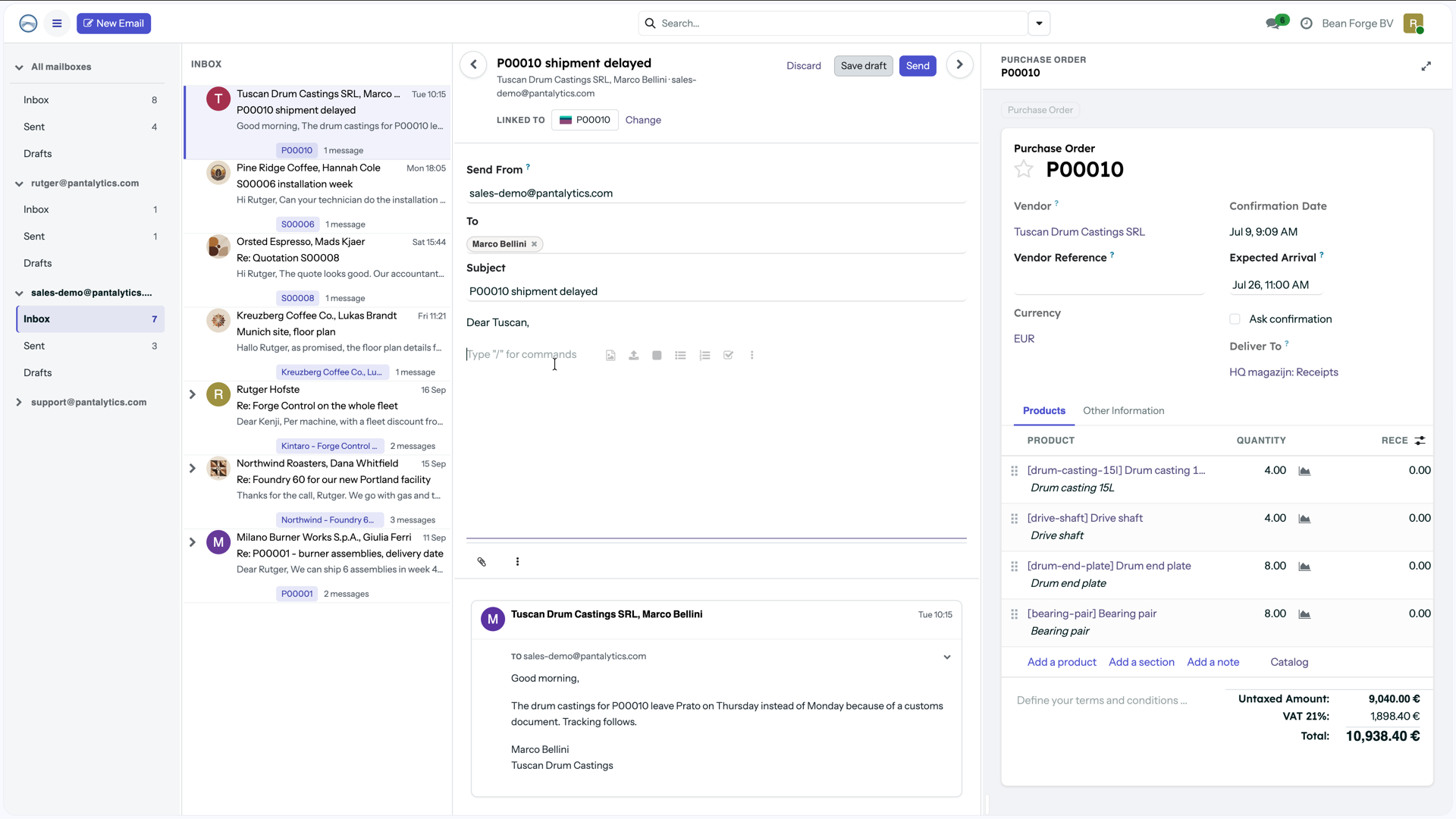
An email from a supplier about a delayed delivery. Mail Pro linked it to purchase order P00010 by itself, and the order sits next to it while you reply.
What does not belong to a record stays in your mailbox at Microsoft or Google. You can still read it in the Mail Pro inbox, but it is fetched live and not stored in Odoo. So there is no copy of everyone's private email in your database. Per mailbox you decide how much goes into Odoo: only replies, or new email from existing contacts as well.
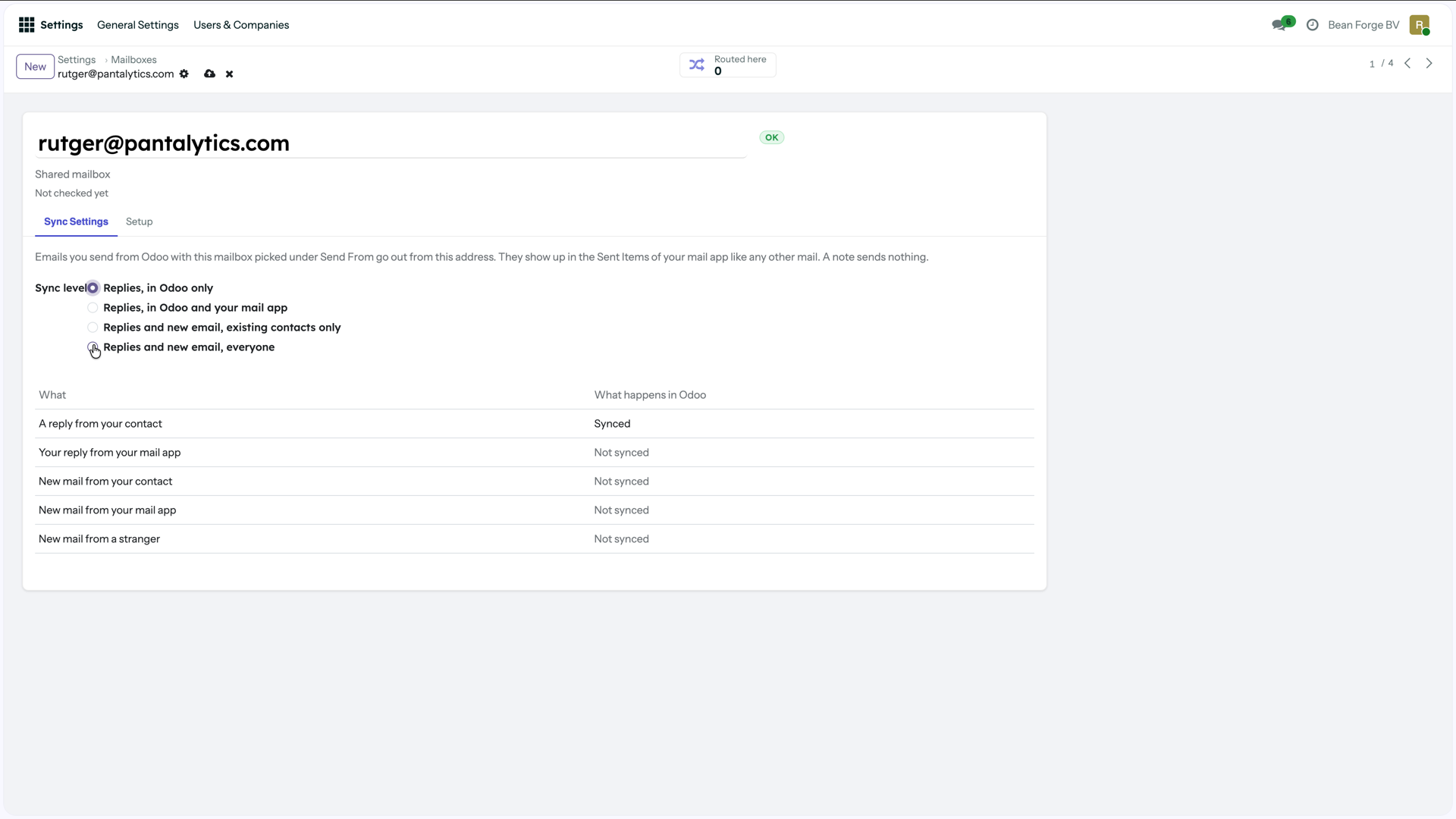
Per mailbox you decide what reaches Odoo. The table below it shows what happens to each kind of email.
Mail Pro has no AI that reads your email and no team inbox with assignment and SLA. That is a choice, not a gap in the roadmap.
How do you add your own mailbox, and how do you send email?
This is a difference you only notice once your team starts using it.
In MailDesk an administrator connects the mailboxes. For each address they create a mailbox account with an incoming and an outgoing server, and for each mailbox they decide who may open it. According to the documentation, regular users cannot add a mailbox themselves. You send from MailDesk's own compose window, where you pick the mailbox to send from. MailDesk uses its own connection to Microsoft for this, not Odoo's. A quotation or invoice you send with Odoo's regular Send button therefore goes through Odoo's own mail settings.
In Mail Pro the administrator registers the connection with Microsoft or Google once. After that, each colleague clicks Connect Mailbox and signs in with their own account. Mail Pro then creates a personal mailbox that only that colleague sees. The administrator can send everyone an invitation with one button. From then on, every email you send from Odoo, including a quotation, an invoice or a reply in the chatter, goes out from your own address. It shows up in your Sent Items in Outlook or Gmail, and a reply comes back to you rather than to a shared inbox.
How do Mail Pro and MailDesk compare, point by point?
| MailDesk | Mail Pro | |
|---|---|---|
| What is in Odoo | Your whole mailbox | Only email that belongs to a record |
| Sync | Both ways (from Pro) | From the mailbox to Odoo, the rest read live |
| Email on the right record | By hand, automatic from Business | Automatic, fixable in one click |
| Adding your own mailbox | Administrator creates an account per address | Each user signs in themselves, in one click |
| Quotation or invoice from Odoo | Through Odoo's own mail settings | From your own address, in your Sent Items |
| AI | Summaries, suggested replies, phishing check | No |
| Team inbox with assignment | Yes (Business and up) | No |
| Still need Outlook or Gmail | Not necessarily | Yes, alongside |
Are MailDesk and Mail Pro GDPR compliant?
Yes, both. MailDesk calls itself GDPR compliant because all email stays in your own Odoo and never passes through Metzler IT, and that is true. The difference is how much there is to protect.
A full copy of every mailbox in Odoo means that an administrator, a leak or a stolen backup reaches everyone's correspondence, including private email that has nothing to do with your customers. The GDPR also asks you to keep no more data than you need, and to be able to delete it when someone asks. All of that can be handled, but it takes more work the more there is.
With MailDesk's AI features, the content of an email goes to the AI provider you pick, unless you run a local model. For most providers that means outside Odoo and outside the EU.
Mail Pro stores only what belongs to a customer or an order, and sends your email to no AI at all.
Should I choose Mail Pro or MailDesk?
Choose MailDesk if your team lives in email all day and really wants to replace Outlook or Gmail with Odoo, if you want AI help with writing, or if you need a shared inbox with assignment and statuses.
Choose Mail Pro if you want email to sit on the customer, deal or order by itself, so everyone in Odoo sees the whole conversation, and you want to keep using your own email app. And if you would rather not have a copy of everyone's mailbox in your ERP.
Frequently asked questions
Can I replace Outlook or Gmail with Odoo?
With MailDesk you can, especially in the Pro edition with two-way sync. With Mail Pro you cannot, and that is not the aim: you keep working in Outlook or Gmail, and Odoo gets the email that belongs to your customers and orders.
Does a customer's reply land on the right quotation automatically?
With Mail Pro it does, in every edition: Mail Pro works out which record an email belongs to by itself, without aliases. With MailDesk you link email to a record by hand, and automatic linking rules come with the Business package.
Does a quotation from Odoo go out from my own email address?
With Mail Pro it does: every email Odoo sends goes out from your own Microsoft 365 or Gmail address and shows up in your Sent Items. MailDesk sends from your own address in its own compose window; email sent with Odoo's regular Send button goes through Odoo's own mail settings.
Do they work with Microsoft 365, Gmail and IMAP?
Yes, both. For Microsoft 365 and Gmail an administrator registers an app with Microsoft or Google once. For IMAP you enter the server and a password.
Can I use shared mailboxes such as info@ or sales@?
Yes, in both. In MailDesk you decide per mailbox who may open it. In Mail Pro a shared mailbox is visible to all users, and a personal mailbox only to its owner.
Which Odoo versions are supported?
MailDesk supports Odoo 17, 18 and 19. Mail Pro is built for Odoo 19. Both run on Community and Enterprise.
Do they use AI, and where does my email go?
MailDesk has AI for summaries, replies and phishing checks, using your own key with OpenAI, Claude, Gemini, Grok or DeepSeek, or a local model. The email content then goes to that provider. Mail Pro has no AI that reads your email.
What does it cost?
MailDesk costs €24, €49 or €74 per month per Odoo database, depending on the edition. Mail Pro also charges per Odoo database, not per user. Get in touch for the price.
See it for yourself?
Want to see how Mail Pro links email in your own mailbox, or talk first about whether it fits your Odoo? Get in touch.